

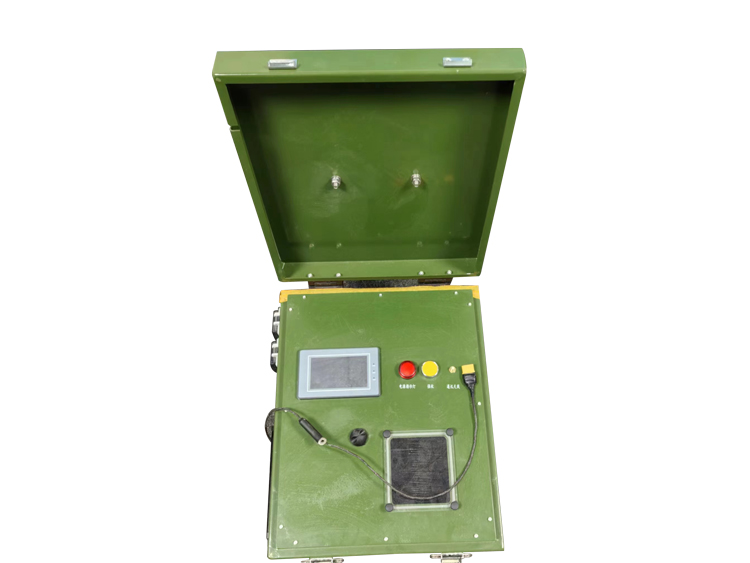
50 Meter Tethered Drone Power Box
Input voltage range: AC220V ± 20% 45Hz~65Hz
Output voltage range: 200-810VDC (Rated output voltage: 800V)
Power: 3.5KW
Storage cable length: 55 meters meters·
1. Advanced power conversion technology, with a typical efficiency of up to 96%, ensures stable and efficient power supply for drones during long-term flight.
2. The mooring box is equipped with intelligent automatic retraction and cable arrangement, and can also switch to manual mode by rotating the reel to retract and release cables. Configuring a 4.3-inch color screen with touch control is more user-friendly and convenient, with functions such as displaying box temperature, wire length, current and voltage, electricity consumption, torque adjustment, switching between Chinese and English, recording abnormal information, and a forced collection button. Relevant abnormalities will be promptly alerted through auxiliary reminders such as sound and light.
50 Meter Tethered Drone Power Box: Complete Installation and Technical Guide
Introduction to Compact Tethered Power Systems
The 50-meter tethered drone power box represents the optimal solution for operations requiring rapid deployment and reliable power in space-constrained environments. As the most compact system in its category, it delivers professional-grade performance for continuous drone operations while maintaining exceptional portability and ease of use. Designed specifically for tactical security operations, emergency response scenarios, and mobile platform deployments, this power solution enables uninterrupted aerial presence without the limitations of battery-powered systems.
This comprehensive guide provides detailed technical specifications, step-by-step installation procedures, visual setup references, and systematic troubleshooting methodology. Whether you're implementing the system for the first time or maintaining an existing installation, this document contains the essential information needed to ensure optimal performance and reliability in various operational conditions.
Technical Specifications and Performance Metrics
Power System Specifications
The 50-meter power box features an advanced power delivery system optimized for compact operations. The input power acceptance ranges from 100-240V AC at 50/60Hz, with optional DC input compatibility from 12-48V for vehicle-based operations. The system delivers 600W continuous power output with 90%+ conversion efficiency, ensuring maximum power utilization while minimizing energy waste. The integrated lithium-ferro-phosphate backup battery provides 10 minutes of emergency operation during power source transitions, with automatic switchover circuitry for uninterrupted drone operation.
The thermal management system utilizes passive cooling during normal operation, with an intelligent active cooling system that engages only during high-temperature conditions or maximum load operations. This approach significantly reduces acoustic signature while maintaining optimal operating temperatures. The system operates reliably in ambient temperatures from -10°C to 45°C, with storage capability from -30°C to 60°C.
Physical and Environmental Specifications
Designed for maximum portability, the main power unit measures 350mm × 250mm × 150mm with a total weight of 5.5kg. The enclosure consists of impact-resistant composite material with aluminum reinforcement at stress points, providing durability without excessive weight. The system carries an IP54 environmental protection rating, making it resistant to dust ingress and water splashes from any direction, suitable for outdoor operations in various weather conditions.
The tether system incorporates a lightweight hybrid cable weighing approximately 1.8kg for the full 50-meter length. The cable diameter measures 4.5mm with a minimum bend radius of 30mm, featuring a breaking strength of 80kg. The integrated conductors include 16AWG power wires and single-mode fiber optics, providing both power transmission and secure data connectivity in a single cable assembly.
Interface and Control Specifications
The user interface features a simplified control panel with color-coded status indicators and a monochrome LCD display showing essential parameters including output voltage, current, system temperature, and operational status. Communication interfaces include Gigabit Ethernet for data connectivity, HDMI for direct video output, and USB-C for system diagnostics and configuration. The system supports remote monitoring and control through web interface accessibility when connected to network infrastructure.
The drone interface module provides secure mechanical locking with automatic power sequencing, preventing connection/disconnection under load. The system incorporates comprehensive protection circuits including over-voltage protection, over-current protection, short-circuit protection, and thermal overload protection, all with automatic recovery functions once fault conditions are resolved.
Installation Diagrams and Setup Configuration
System Component Layout
The 50-meter tethered system consists of three primary components arranged in a linear deployment configuration. The ground power station serves as the foundation, positioned on a stable, level surface with clear ventilation access. The tether cable deploys vertically from the power station to the drone interface module, maintaining a clear flight corridor free from obstructions. The drone mounting point connects to the aircraft's power distribution system, completing the power delivery pathway.
The optimal deployment geometry maintains the power station at least 3 meters from any large obstructions, with the tether cable extending vertically to minimize horizontal displacement. For operations requiring horizontal offset, the system can accommodate angles up to 30 degrees from vertical without performance degradation, though power efficiency decreases proportionally with increased angle.
Connection Point Details
The power input connection panel located on the rear of the unit features color-coded connectors and mechanical keying to prevent incorrect cable installation. The primary AC input connector utilizes an IEC-C14 inlet compatible with standard power cables, while the auxiliary DC input employs a waterproof military-grade connector with screw-type locking mechanism. The tether output connection uses a proprietary quick-disconnect interface with automatic safety shutter mechanism that prevents exposure of powered contacts when disconnected.
The drone interface connection system incorporates a three-stage engagement process: initial mechanical alignment, secondary electrical connection, and final locking confirmation. Visual indicators provide clear confirmation of proper engagement, while the electronic interlock system prevents power application until full connection verification is complete. This multi-stage approach ensures reliable operation even in low-visibility conditions.
Ground Deployment Configuration
The recommended ground setup positions the power station with the status display facing the operator's normal monitoring position, providing clear visibility of system parameters during operation. The tether cable should deploy from the top of the unit with a smooth, unobstructed path to the drone. For extended operations, the cable management system includes a removable stake guide that maintains cable organization during deployment and retrieval.
Environmental considerations include maintaining a clear area of 1 meter around the power station for adequate ventilation, positioning the unit on an elevated surface when operating in wet conditions, and orienting the cooling vents away from direct sources of dust or debris. The system includes mounting points for optional security tethers to prevent theft or accidental displacement during unattended operations.
Step-by-Step Installation Procedure
Pre-Installation Site Assessment
Begin with a comprehensive site survey to identify optimal placement location. Verify the availability of adequate power sources within 5 meters of the proposed setup location. Assess overhead clearance to ensure a minimum of 60 meters vertical airspace free from obstructions such as power lines, tree branches, or structural elements. Evaluate ground conditions to identify level, stable surfaces that provide proper drainage in case of precipitation.
Confirm environmental conditions fall within operational parameters, including temperature, wind speed, and precipitation levels. Identify potential hazards including public access areas, vehicle traffic patterns, and underground utilities. Establish a secure perimeter around the operational area with a minimum radius of 10 meters from the power station location.
Power System Setup Sequence
Positioning: Place the power station on a firm, level surface with the display panel facing the operator position. Extend the stabilizing feet if equipped and verify the unit remains stable when moderate force is applied to each corner.
Power Connection: Connect the appropriate power input cable to the corresponding input port on the power station. Route the cable to avoid trip hazards and strain on the connection point. Connect the opposite end to your power source, verifying source voltage compatibility before energizing.
Initial Power-Up: Activate the power source and observe the power station status indicators. The system should progress through a 15-second initialization sequence, concluding with a steady green power indicator and system ready message on the display.
System Verification: Access the system status menu through the display interface and verify all parameters read within normal ranges. Confirm input voltage stability, system temperature, and backup battery charge status before proceeding to tether connection.
Tether Deployment and Connection
Tether Inspection: Unspool the first 5 meters of tether cable and visually inspect for any signs of damage, kinks, or abrasion. Pay particular attention to the connector ends, verifying all pins are straight and free from debris.
Ground Station Connection: Align the tether connector with the ground station output port, matching the alignment key with the corresponding slot. Apply firm, straight pressure until the connector seats fully and the locking collar rotates to the locked position. Listen for the audible click confirming proper engagement.
Cable Management: Deploy the tether cable along the intended flight path, avoiding sharp bends and abrasion points. Use the provided cable guides if available to maintain proper bend radius and prevent entanglement.
Drone Connection: Power on the drone and align the tether interface module with the aircraft connection point. Engage the mechanical locking mechanism first, followed by the electrical connector. Verify the connection status indicator shows proper engagement before proceeding to flight operations.
Operational Verification and Testing
Pre-Flight Systems Check: Initiate the automated systems check through the ground control station interface. Verify power delivery parameters, data link connectivity, and safety system status.
Low-Power Test: With the drone secured, apply minimal power to verify proper system operation without taking off. Monitor all system parameters for stability during this initial power application.
Gradual Load Increase: Slowly increase power output while monitoring system response. Verify stable voltage delivery, proper thermal management, and consistent data transmission throughout the power range.
Final Operational Check: Complete a full systems verification immediately before launch, confirming all parameters remain within normal operating ranges and no warning indicators are active.
Troubleshooting and Failure Analysis
Power Delivery Issues
No Power Output
Cause Analysis: Complete loss of power output typically originates from input power issues, internal protection circuit activation, or system control failure. Begin troubleshooting by verifying input power availability and quality, then progress to internal system checks.
Resolution Steps:
Verify input power source functionality with a known-good device
Check all power cables for damage and secure connection
Reset the main circuit breaker if equipped
Perform system hard reset by disconnecting all power for 60 seconds
Check backup battery status and charge level
Contact technical support if issue persists
Intermittent Power Output
Cause Analysis: Intermittent operation typically indicates connection issues, thermal protection activation, or power source instability. The pattern of interruption provides valuable diagnostic information, with regular cycling suggesting thermal issues and random interruptions indicating connection problems.
Resolution Steps:
Inspect all connection points for corrosion, damage, or looseness
Monitor system temperature during operation
Verify input power stability with dedicated monitoring equipment
Check tether cable for internal damage or pin retention issues
Test with reduced load to identify capacity-related issues
Communication and Data Link Failures
Complete Data Loss
Cause Analysis: Total loss of data connectivity typically results from fiber optic damage, connector misalignment, or interface module failure. The system utilizes redundant data paths, making complete failure rare and suggesting significant physical damage or multiple component failures.
Resolution Steps:
Verify ground station data interface connectivity
Inspect fiber optic connectors for contamination or damage
Test with known-good interface equipment
Check system configuration for correct data routing
Examine tether connection points for physical damage
Intermittent Data Connectivity
Cause Analysis: Intermittent data transmission usually indicates marginal connection quality, electromagnetic interference on copper components, or early-stage component failure. The specific pattern of interruptions often identifies the affected subsystem.
Resolution Steps:
Clean and reseat all data connection points
Verify proper grounding and shielding integrity
Monitor system error logs for correlation with environmental factors
Test with reduced cable length if possible
Check for mechanical stress at connection points
Thermal Management Issues
Over-Temperature Protection Activation
Cause Analysis: Frequent thermal protection activation indicates insufficient cooling, excessive ambient temperatures, or internal component failure generating excess heat. The specific location of temperature sensors helps identify the affected subsystem.
Resolution Steps:
Verify clearance around ventilation openings
Clean air filters and heat sink surfaces
Monitor ambient temperature versus system capacity
Check fan operation and bearing noise
Reduce operational load during high-temperature conditions
Reduced Power Output During Operation
Cause Analysis: Progressive power reduction during extended operation typically results from thermal derating, a protective feature that reduces output power to maintain safe operating temperatures. This indicates the system is operating near its thermal limits.
Resolution Steps:
Improve ventilation around the power station
Reduce operational power requirements if possible
Implement external cooling solutions for high-temperature environments
Verify proper thermal interface materials at internal connections
Consider operational scheduling during cooler periods
Connection and Mechanical Issues
Tether Connection Failures
Cause Analysis: Difficulty establishing or maintaining tether connection typically results from connector damage, pin misalignment, or locking mechanism failure. These issues often develop gradually with visible warning signs before complete failure occurs.
Resolution Steps:
Visually inspect connectors for bent pins or housing damage
Verify proper alignment during connection sequence
Check locking mechanism operation and spring tension
Test connection continuity with diagnostic equipment
Replace damaged connectors using proper installation tools
Physical Damage Assessment
Cause Analysis: Physical damage to system components typically results from improper handling, transportation incidents, or environmental factors. The specific nature and location of damage provides insight into the cause and potential secondary issues.
Resolution Steps:
Document all visible damage with photographs
Perform complete system functional testing
Check for internal damage not visible externally
Replace damaged components following manufacturer guidelines
Implement improved handling procedures to prevent recurrence
Preventive Maintenance and System Optimization
Regular Maintenance Schedule
Implement a comprehensive maintenance program based on operational hours and environmental conditions. Basic maintenance includes daily visual inspections, weekly connection verification, monthly performance testing, and quarterly comprehensive maintenance. Document all maintenance activities in the system log for trend analysis and warranty validation.
Performance Optimization
Maximize system performance through proper configuration, environmental management, and operational planning. Regular firmware updates provide performance enhancements and new features, while proper cable management extends component lifespan. System calibration ensures accurate monitoring and control, while proper storage conditions maintain optimal performance between deployments.
This website uses cookies to ensure you get the best experience on our website.

 Español
 Pусский
 العربية
 中文
中文



 WhatsApp
 Phone
Phone